主题
OpenEuler 22.03 LTS 源码编译安装 Nginx 1.30.4
一、版本约束
软件不同版本在使用中可能带来不可预知的影响,需统一整理、固定版本,不轻易变更。
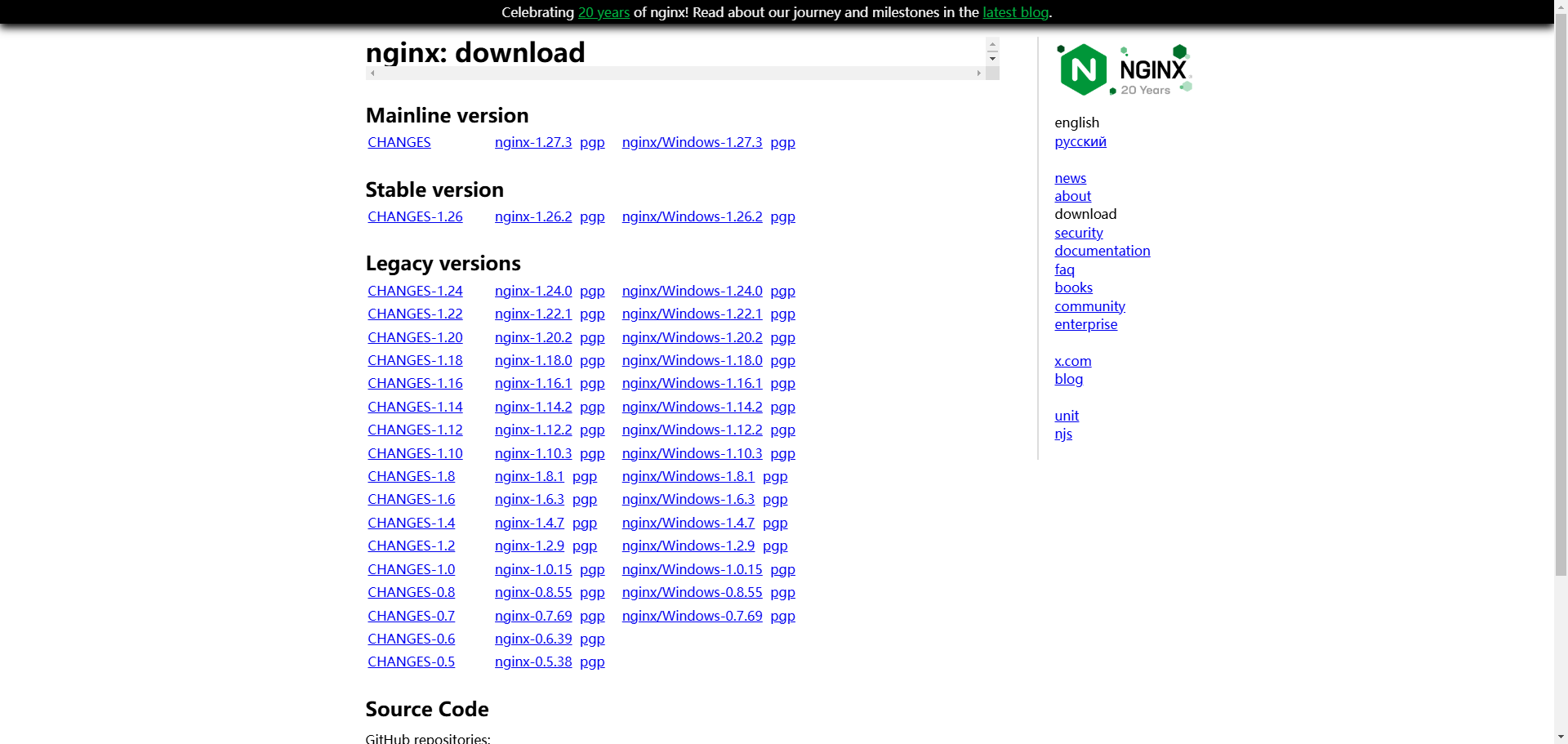
- 在 Nginx 开源版官网 右侧 Download 可查看各版本:Mainline 为主干版(版本号奇数),Stable 为稳定版(版本号偶数)。1.30.x 为当前 Stable / LTS 线。
- 本文环境与版本:
- OpenEuler 22.03 LTS(含 SP4)
- Nginx:1.30.4
二、软件安装路径
| 用途 | 路径 |
|---|---|
| 部署路径 | /home/application/nginx |
| 静态代码 | /home/application/nginx/html |
| 日志路径 | /home/application/nginx/logs |
| 主配置 | /home/application/nginx/conf/nginx.conf |
| 站点配置 | /home/application/nginx/conf.d/* |
| SSL 证书 | /home/application/nginx/cert |
三、安装
3.1 下载
bash
wget http://nginx.org/download/nginx-1.30.4.tar.gz3.2 安装依赖
Nginx 由 C 编写;
pcre-devel支持正则,openssl-devel用于加密。
bash
yum -y install gcc pcre-devel openssl-devel tar make zlib zlib-devel3.3 创建 nginx 用户
bash
useradd -s /sbin/nologin nginx -M3.4 指定安装目录并配置编译选项
本次编译启用以下模块:
- 启用 HTTP/2 模块(
--with-http_v2_module) - 启用 SSL 模块(
--with-http_ssl_module) - 启用 Stub Status 模块(
--with-http_stub_status_module) - 启用 4 层 TCP/UDP 代理模块(
--with-stream) - 启用 Gzip 静态模块(
--with-http_gzip_static_module)
bash
mkdir -p /home/application/nginx
tar -xf nginx-1.30.4.tar.gz
cd nginx-1.30.4
./configure \
  --prefix=/home/application/nginx \
  --user=nginx \
  --group=nginx \
  --with-http_v2_module \
  --with-http_ssl_module \
  --with-http_stub_status_module \
  --with-stream \
  --with-http_gzip_static_module \
--pid-path=/home/application/nginx/nginx.pid3.5 编译安装
bash
make && make install3.6 服务启动
3.6.1 修改 nginx.conf
WARNING
使用 systemd 管理时,需在配置中声明与 unit 一致的 pid 路径,并指定运行用户 nginx。
编辑 /home/application/nginx/conf/nginx.conf,确保包含:
bash
user nginx;
pid /run/nginx.pid;3.6.2 编写 nginx.service
bash
cat > /lib/systemd/system/nginx.service << 'EOF'
[Unit]
Description=The NGINX HTTP and reverse proxy server

[Service]
Type=forking
PIDFile=/run/nginx.pid
ExecStart=/home/application/nginx/sbin/nginx
ExecReload=/home/application/nginx/sbin/nginx -s reload
ExecStop=/bin/kill -s QUIT $MAINPID
PrivateTmp=true
LimitNOFILE=65535

[Install]
WantedBy=multi-user.target
EOF3.6.3 启动并设置开机自启
bash
systemctl daemon-reload
systemctl enable nginx
systemctl start nginx
systemctl status nginx重载配置(等价于 nginx -s reload):
bash
systemctl reload nginx验证版本与模块:
bash
/home/application/nginx/sbin/nginx -V四、日志格式配置
在 http {} 块中增加 map 与 log_format(建议放在 http {} 靠前位置,避免覆盖其他站点使用的格式):
bash
map "$time_iso8601 # $msec" $time_iso8601_ms { "~(^[^+]+)(\+[0-9:]+) # \d+\.(\d+)$" $1.$3$2; }
log_format main
    '{"timestamp":"$time_iso8601_ms",'
    '"server_ip":"$server_addr",'
    '"remote_ip":"$remote_addr",'
    '"xff":"$http_x_forwarded_for",'
    '"remote_user":"$remote_user",'
    '"domain":"$host",'
    '"url":"$request_uri",'
    '"referer":"$http_referer",'
    '"upstreamtime":"$upstream_response_time",'
    '"responsetime":"$request_time",'
    '"request_method":"$request_method",'
    '"status":"$status",'
    '"response_length":"$bytes_sent",'
    '"request_length":"$request_length",'
    '"protocol":"$server_protocol",'
    '"upstreamhost":"$upstream_addr",'
    '"http_user_agent":"$http_user_agent"'
    '}';
access_log /home/application/nginx/logs/access.log main;修改后执行:
bash
systemctl reload nginx4.1 日志查询示例
常用字段:请求时间戳、客户端 IP、接口路径、上传/下载大小、后端处理耗时。
若需要把 Nginx 日志采集进可观测平台做分析,可参考:Nginx 日志采集与分析:Vector + ClickHouse + Grafana 全流程实战。
bash
tail -n 1000 /home/application/nginx/logs/access.log | awk '{
  match($0,/"timestamp":"([^"]+)"/); t=substr($0,RSTART+13,RLENGTH-14);
  match($0,/"remote_ip":"([^"]+)"/); ip=substr($0,RSTART+14,RLENGTH-15);
  match($0,/"url":"([^"]+)"/); u=substr($0,RSTART+7,RLENGTH-8);
  split(u,arr,"?"); short_u=arr[1];
  match($0,/"request_length":"([^"]+)"/); rq=substr($0,RSTART+18,RLENGTH-19)+0;
  match($0,/"response_length":"([^"]+)"/); rs=substr($0,RSTART+19,RLENGTH-20)+0;
  match($0,/"upstreamtime":"([^"]+)"/); ut=substr($0,RSTART+16,RLENGTH-17);
  print t, ip, short_u, "上传:"rq/1048576"M", "下载:"rs/1048576"M", "后端耗时:"ut"s"
}'五、日志切割
日志一般输出在 /home/application/nginx/logs/*.log。使用 logrotate 自动切割:
bash
vim /etc/logrotate.d/nginx内容:
bash
/home/application/nginx/logs/*.log
{
    missingok
    daily
    copytruncate
    rotate 30
    notifempty
    dateext
    postrotate
    systemctl reload nginx
    endscript
}临时测试切割是否生效:
bash
/usr/sbin/logrotate -vf /etc/logrotate.d/nginx切割后目录示例:
bash
ll /home/application/nginx/logs/
# access.log
# access.log-20240806
# error.log
# error.log-20240806NOTE
更完整的 logrotate 说明可参考:Linux 日志管理工具 Logrotate。
六、平滑升级步骤
适用于已有 Nginx 升级到 1.30.4(编译参数须与线上一致,至少包含上述五个模块)。
6.1 下载并解压
bash
wget https://nginx.org/download/nginx-1.30.4.tar.gz
tar xf nginx-1.30.4.tar.gz6.2 查看原先使用的模块
bash
/home/application/nginx/sbin/nginx -V6.3 按相同模块重新 configure 并编译
bash
cd nginx-1.30.4
./configure \
  --prefix=/home/application/nginx \
  --user=nginx \
  --group=nginx \
  --with-http_v2_module \
  --with-http_ssl_module \
  --with-http_stub_status_module \
  --with-stream \
  --with-http_gzip_static_module \
  --pid-path=/home/application/nginx/nginx.pid
makeWARNING
平滑升级阶段只执行 make,不要执行 make install,以免覆盖配置与 html。
6.4 替换二进制并平滑升级
bash
mv /home/application/nginx/sbin/nginx /home/application/nginx/sbin/nginx-old
cp objs/nginx /home/application/nginx/sbin/
make upgrade6.5 验证版本
bash
/home/application/nginx/sbin/nginx -v预期:
bash
nginx version: nginx/1.30.46.6 测试访问